| 25th Oct 1998
|
Introduction to Database Development: Part 2
|
|
| Back
Other Sections: Tables Queries (1) Queries (2) |
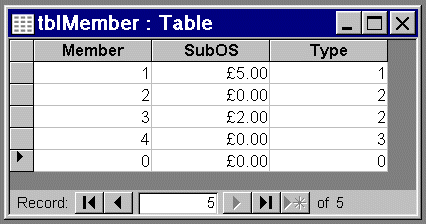
Below is an Access table in datasheet view:
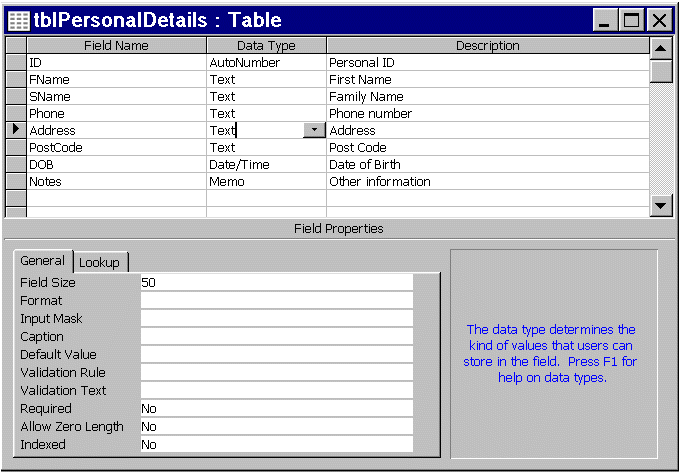
Notice that the middle column has a currency datatype; it will not accept other datatypes e.g. text. Constraint of data is one way of ensuring validity of information. Column 1 "Member" is related to the ID field in tblPersonalDetails. The following is an Access table in design view.
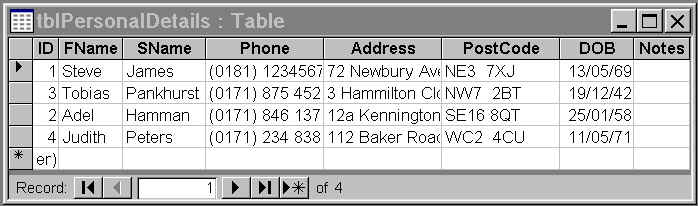
The design view window is split into 3 panes. The upper pane displays the Field Name, Data Type, and Description for each field. The lower left pane displays the Field Properties for the selected field; in this example the selected field is 'Address' (as indicated by the black arrow-head). We can see that the Field size is 50 which is the default. If place the cursor next to the Field Size Property the lower right pane (the blue writing) changes to inform us that this property specifies the maximum (number of characters) that can be displayed in this field. It invites us to press F1 for more information on Field Sizes. Below is the tblPersonalDetails in datasheet view.
Although data can be entered, deleted or otherwise edited directly in the datasheet view it is more easily manipulated using a form.
|
Developer Links
|